Integrations
You can build on pairmux. A desktop app that lists every agent you run, a web dashboard, an editor side panel, and an agent that manages other agents all need the same two things: to follow the fleet (every terminal in the tree) as it changes, and to act on it. pairmux provides both as ordinary commands, so what you build inherits the CLI's rules (scopes, busy locks and secret handling) instead of reimplementing them.

| you are building | follow with | act with |
|---|---|---|
| a GUI, dashboard or editor panel | pairmux events --tree (stream) | pairmux --json <command> |
| a supervisor agent (shell tool) | pairmux events --tree --wait | pairmux <command> |
| a supervisor agent (MCP) | the pairmux_events tool | the other pairmux_* tools |
| a plugin that teaches an agent pairmux | — | pairmux skill install |
Follow: pairmux events
pairmux events prints the fleet as JSON lines, one object per line, until you interrupt it or
its reader closes the pipe. See the CLI reference for every flag.
A closed pipe is noticed only on the next write, and a quiet fleet writes nothing, so a stream whose
front end crashed could otherwise run on. Start it with --exit-with-parent and it ends once the
process that started it has exited, with a last end line whose reason is parent-exited. Leave
the flag off when the stream should outlive its starter, as in nohup pairmux events > file &.
Two cases are not detected:
- The starter is pid 1 (your front end is PID 1 in a container, a systemd unit or a launchd agent). The flag has no effect, because pid 1 outlives the stream.
- On macOS and Linux, the starter exits before
pairmuxhas started, as insh -c 'pairmux events --exit-with-parent &'.
pairmux events [--tree] [--interval 1s] [--no-snapshot] [--status S,S] [--max N] [--timeout D] [--exit-with-parent]
pairmux events --tree
{"schema":"pairmux.events.v1","seq":1,"ts":"2026-11-17T15:00:01.05Z","type":"snapshot","terminals":[{"name":"lead","status":"idle","mode":"hooks","child_socket":"pairmux-lead","path":"lead"},{"name":"tests","status":"idle","mode":"hooks","path":"lead/api/tests"}]}
{"schema":"pairmux.events.v1","seq":2,"ts":"2026-11-17T15:00:01.68Z","type":"changed","path":"lead/api/tests","terminal":{"name":"tests","status":"running","mode":"hooks","current_cmd":"go test ./...","lock_holder":81423,"path":"lead/api/tests"},"changes":["status","current_cmd","lock_holder"],"from":"idle"}
{"schema":"pairmux.events.v1","seq":3,"ts":"2026-11-17T15:00:05.88Z","type":"changed","path":"lead/api/tests","terminal":{"name":"tests","status":"idle","mode":"hooks","path":"lead/api/tests"},"changes":["status","current_cmd","lock_holder"],"from":"running"}
Event types
type | when | fields |
|---|---|---|
snapshot | first line, unless --no-snapshot | terminals: every row, as ls --tree --json shows it |
added | a terminal appeared (created, or a new layer came alive) | path, terminal |
changed | a tracked field of a row changed (see changes) | path, terminal (the new row), changes, from (previous status, when the status changed) |
removed | a terminal is gone from the listing (pruned, or its layer torn down) | path |
end | the stream stopped on --max, --timeout or --exit-with-parent (a signal stops it without an end line) | reason: max, timeout or parent-exited |
Every line has schema (pairmux.events.v1), seq (1, 2, 3 … within one stream) and ts
(RFC 3339, UTC). changes lists fields from this set: status, current_cmd, lock_holder,
notes, child_socket, mode.
--status S,S keeps only the added and changed events that leave a terminal in one of the
listed states. removed events always pass, and --status does not filter the snapshot.
A terminal that dies stays in the listing with status dead because its journal is retained. You
receive a changed event whose from is the previous status and whose terminal.status is dead.
removed arrives only after someone prunes it.
Output is not an event. New output changes only a row's last_activity. Rows carry that field,
but it never triggers a line, because it would turn the stream into a firehose. Read content with
pairmux --json peek <path> or log when the user opens that terminal.
Rows
The rows are the ls rows: name, status (running, idle, awaiting-input, dead,
unknown), mode, and when present current_cmd, lock_holder (pid holding the write lock),
notes (unread human notes), last_activity, child_socket (the layer this terminal drives) and
path (how to address it from the stream's endpoint). Use path as the stable key.
Without --tree
The stream covers one layer: the endpoint you run it against (--socket, PAIRMUX_SOCKET, or the
default). With --tree it covers that layer and every live layer below, which is what a front end
almost always wants.
Act: pairmux --json <command>
Every action a front end offers is a pairmux command, run as a child process with --json, which
prints one pairmux.v1 envelope:
| button in your UI | command |
|---|---|
| New agent | pairmux --json new --name <path> --cmd "claude" --cwd <dir> |
| Run | pairmux --json run <path> "<command>" --timeout 60s |
| Type a line | pairmux --json send <path> --text "<line>" --enter |
| Show screen | pairmux --json peek <path> --screen |
| History | pairmux --json log <path> --cmd <n> / --grep <re> / --range A:B |
| Leave a note | pairmux --json note <path> "<text>" |
| Kill / clean up | pairmux --json kill <path>, pairmux --json prune [<path>] |
Check ok. On failure, error.code is stable (E_BUSY, E_NO_TERMINAL, E_SCOPE, …) and
error.hint is written for a person. next lists what to do after a reply, in order. Entries can
be safety instructions or contain placeholders, so show them to the user as suggestions instead of
running them automatically.
Taking over a terminal is the one action that is not a JSON call: pairmux attach <path> needs
a real terminal. A GUI that embeds a terminal widget (a PTY plus xterm.js, or a native terminal
view) runs pairmux attach <path> inside it. Any other front end opens the user's terminal
emulator on that command. When the user detaches (Ctrl-b d), the process ends.
Supervise: pairmux events --wait
An agent cannot consume a stream that never ends. --wait turns events into a blocking call that
returns one pairmux.v1 envelope as soon as the fleet changes:
pairmux events --tree --wait --status awaiting-input,dead --timeout 30m
changed
  changed lead/api/tests  running → awaiting-input  (status, lock_holder)
next:
  pairmux peek lead/api/tests   # it needs input: read the prompt before answering
  pairmux events --wait --tree --status awaiting-input,dead   # keep watching
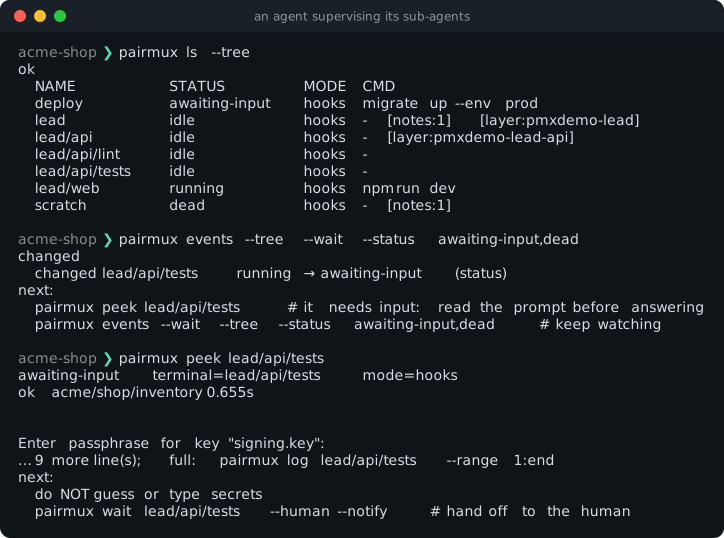
The envelope's events array holds the same objects as the stream, without schema and seq.
status is changed, timeout when nothing qualified before the deadline (default 10
minutes), or interrupted when a signal or --exit-with-parent stopped it before anything
changed. An interrupted wait still exits with code 0; run it again rather than lengthening the
timeout. --max N waits for N changes, and --status filters as it does for the stream. Over MCP,
this call is the pairmux_events tool, with tree, status, max and timeout arguments.
A reference client
This minimal front-end core in Python keeps the fleet in a dict and reacts to each event:
import json
import subprocess

fleet = {}  # path -> row

proc = subprocess.Popen(["pairmux", "events", "--tree", "--exit-with-parent"],
                        stdout=subprocess.PIPE, text=True)
for line in proc.stdout:
    ev = json.loads(line)
    if ev.get("schema") != "pairmux.events.v1":
        continue  # an incompatible pairmux; tell the user to upgrade
    if ev["type"] == "snapshot":
        fleet = {row["path"]: row for row in ev["terminals"]}
    elif ev["type"] in ("added", "changed"):
        fleet[ev["path"]] = ev["terminal"]
        if ev["terminal"]["status"] == "awaiting-input":
            print(f"{ev['path']} needs you — open it with: pairmux attach {ev['path']}")
    elif ev["type"] == "removed":
        fleet.pop(ev["path"], None)
    # redraw(fleet)


def act(*args):
    out = subprocess.run(["pairmux", "--json", *args], capture_output=True, text=True).stdout
    return json.loads(out.strip().splitlines()[-1])
--exit-with-parent makes pairmux events exit when this process does, so a crashed front end
leaves no stream behind.
The same loop works in any language that can spawn a process and read lines — a Tauri or Electron main process, a VS Code extension host, a Go or Rust daemon.
Where your front end sits in the tree
A front end runs with the privileges of whoever starts it:
- Started by a person (no
PAIRMUX_SCOPEin its environment), it is at the top. It sees and can drive every layer, exactly like the TUI. - Started inside a pairmux terminal, it inherits that terminal's scope. It can follow and drive only
that terminal's subtree, and anything above returns
E_SCOPE. This is the right default for a dashboard an agent builds for its own workers.
Scopes keep cooperating agents in their own layer. They are not a security boundary between users.
Secrets
Events never carry terminal output, so nothing typed into a pane reaches a subscriber. Envelopes
from run, peek and log can carry output. pairmux withholds what it can (wait --human returns
no output, and a recognized secret prompt never suggests send), but treat any output your front
end displays like terminal scrollback. Never offer a "type the password for the agent" button.
Answering a credential prompt is the human's job, done by attaching.
Stability
pairmux.v1(envelopes) andpairmux.events.v1(events) only grow. A minor release can add fields,typevalues,changesnames and error codes. Ignore what you do not know.- Removing a field or changing its meaning means a new schema id (
pairmux.events.v2), announced in the changelog. - Human-readable text (the default output, hints and
nextcomments) is for people and can change in any release. Parse JSON only. - Check
schemaon every line or reply. If you depend on a feature added after v1.2, such asevents, also checkpairmux versiononce at start-up.
MCP and skills
pairmux mcp serve exposes the same operations as typed MCP tools over stdio (pairmux_new,
pairmux_run, pairmux_wait, pairmux_events, …) for any MCP client. Each tool returns the
pairmux.v1 envelope as structured content. pairmux skill install installs the agent skill that
teaches an agent when and how to use all of this, including how to supervise sub-agents. See
Agent Skills.