Agent hierarchy
An agent that runs in a pairmux terminal can use pairmux itself. Whatever it opens lands one layer
down, on an endpoint of its own, so a coordinator can start workers, each worker can start its
own sub-agents, and every layer stays separate: names never collide across layers, ls at one layer
lists that layer, and killing a terminal tears down every layer below it.

you (human, your own terminal)       ← the top: no scope, drives everything
└─ lead      claude                  ← layer "pairmux"
   ├─ api    codex                   ← layer "pairmux-lead"
   │  └─ tests  shell                ← layer "pairmux-lead-api"
   └─ web    claude
Control flows down, never up
Every terminal pairmux creates is given a scope: the layer below it. A process inside the terminal may address that layer and anything under it, and nothing else.
from api's pane | result |
|---|---|
pairmux ls, pairmux run tests "go test ./..." | allowed — its own layer |
pairmux --socket pairmux-lead-api-tests ls | allowed — further down |
pairmux --socket pairmux ls (the top layer) | E_SCOPE |
pairmux --socket pairmux-lead send web --text … (a sibling) | E_SCOPE |
pairmux --socket pairmux-lead kill api (itself, from above) | E_SCOPE |
pairmux report "API done; 3 tests added" | allowed — the one upward channel |
So the top of the tree — the agent you run in your own terminal, or a session you started from the TUI — is never driven by anything below it. Only a human (a process with no scope) can address it.
The scope is a guardrail for cooperating agents, not a security boundary: every layer runs as the
same user, and a process that deliberately clears PAIRMUX_SCOPE is outside it. What it reliably
stops is the realistic failure: an agent copying a --socket out of a hint, a log, or its own
instructions and typing into a terminal it was never given. Terminals created by an earlier
pairmux carry no scope and are unrestricted until recreated.
Reach any descendant by path
A coordinator does not need to know derived endpoint names. Address a terminal below by its path, relative to where you stand:
pairmux ls --tree                       # the whole subtree, each row with its path
pairmux peek api/tests                  # terminal tests in the layer api drives
pairmux run api/tests "go test ./..." --timeout 30s
pairmux wait api/tests --done --timeout 120s
pairmux new --name api/lint --cmd "npm run lint -- --watch"   # create directly in api's layer
pairmux kill api/tests
Replies come back in the same terms: terminal is api/tests, and every suggested next command
addresses api/tests, so following them stays on the right layer. A single wait may name several
terminals of one layer (wait api/tests,api/lint); terminals of different layers need separate
waits.
Report upward
A sub-agent tells its creator something with report. It leaves a note on the reporter's own row in
the layer that owns it:
# inside api's pane
pairmux report "API complete; ready for review"
The coordinator receives it in the notes of its next run/peek on api, or blocks for it:
# lead, waiting for any of its workers to report
pairmux wait api,web --note --timeout 1800s
report is the only command that addresses anything above the caller's layer, and all it can do is
talk about the caller. For agents with stop hooks, pairmux report "turn complete" in the hook is
the reliable turn boundary.
Supervise without polling: events --wait
A coordinator with several workers should not loop over peek. One blocking call returns as soon as
anything in its subtree changes, names what changed, and says what to do about it:
# lead: block until any worker or sub-worker needs input or dies
pairmux events --tree --wait --status awaiting-input,dead --timeout 30m
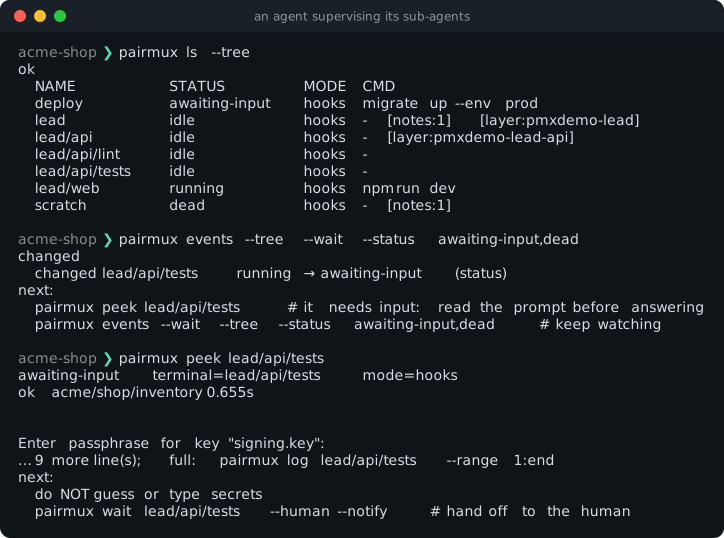
--status keeps only the events that leave a terminal in one of the given states (running,
idle, awaiting-input, dead); without it, the first change of any kind returns. --max N waits
for N changes before it returns. On timeout, the reply's next repeats the call with a longer
deadline. Over MCP, the same call is the pairmux_events tool. wait --note is still the right
call when you are waiting for a specific worker to report.
The environment each terminal carries
| variable | value inside terminal api of layer pairmux-lead |
|---|---|
PAIRMUX_NAME | api |
PAIRMUX_SOCKET | pairmux-lead-api — where its own pairmux commands go |
PAIRMUX_SCOPE | pairmux-lead-api — the highest layer it may address |
PAIRMUX_OWNER_SOCKET | pairmux-lead — where report writes |
Watching and steering the tree: pairmux tui
pairmux tui is the human's console over the whole tree. Typing a bare pairmux ls (or list)
at your own terminal opens it too; agents, pipes and --json keep getting the listing.
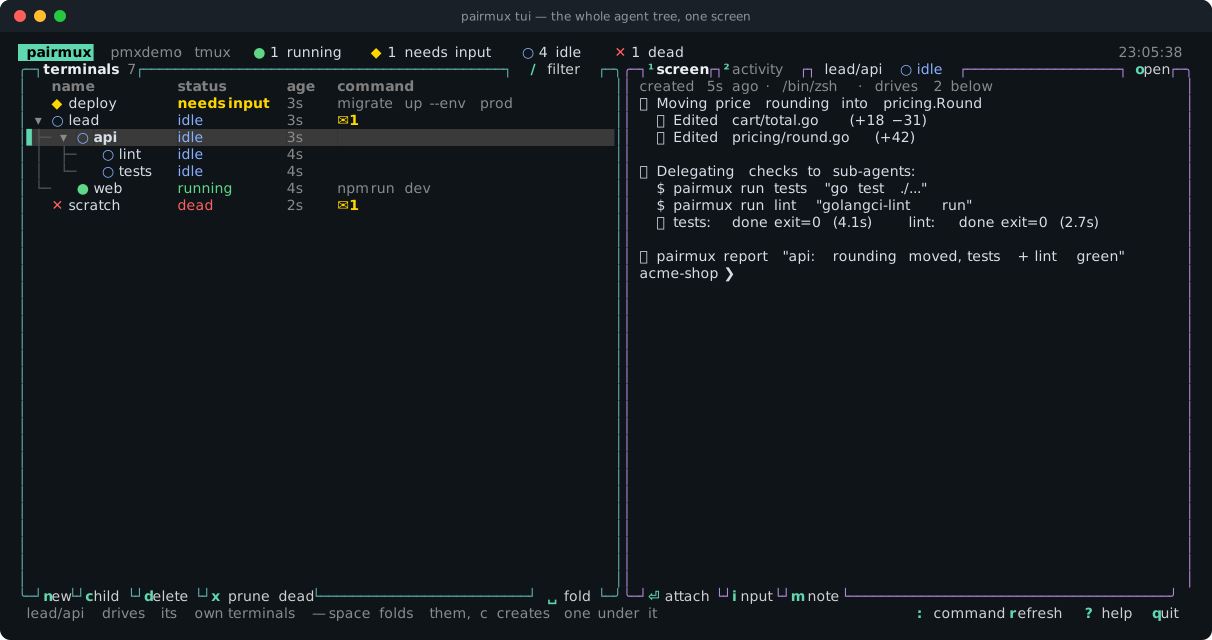
In the TUI you can attach to any terminal with ⏎ (or double-click its row), create workers at the
top (n) or under the selected agent (c), answer a prompt an agent handed you, leave notes, and
run any pairmux command. Destructive actions ask first, and every action runs the same subcommand an
agent would, so the TUI follows the CLI's rules exactly. The TUI guide has the full key
map, the mouse controls, and a tour of each view.
A coordinator recipe
# You, in your own terminal: start the lead agent and watch the tree
pairmux new --name lead --cmd "claude"
pairmux tui

# lead (inside its pane): open workers in its own layer
pairmux new --name api --cmd "codex"
pairmux new --name web --cmd "claude"
pairmux send api --text "Implement the /users endpoint; run pairmux report when done" --enter
pairmux wait api,web --note --timeout 1800s

# api (inside its pane): its own helper terminal, then report up
pairmux new --name tests
pairmux run tests "go test ./..." --timeout 30s
pairmux report "API done; tests green"

# lead can also reach api's helper directly
pairmux peek api/tests